

Interstitial Integration for Web
Follow this guide to integrate the ironSource interstitial for web to monetize your website or application!
Step 1. Add Your Site/App to the ironSource Platform
First, log in to your ironSource account here. Then you’ll need to add your app to our platform.
Add Your App
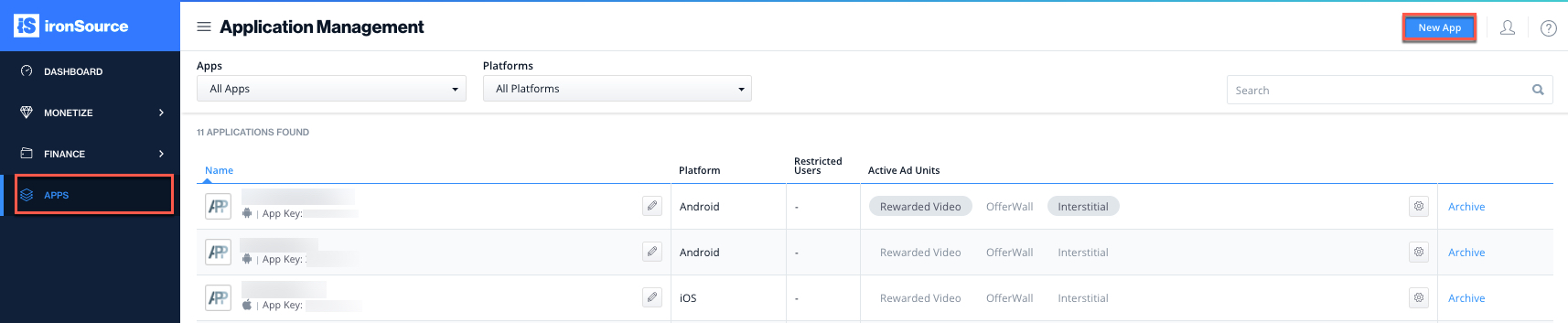
- Navigate to the ‘Apps‘ tab in the left menu and select ‘New App‘ from the top right corner:
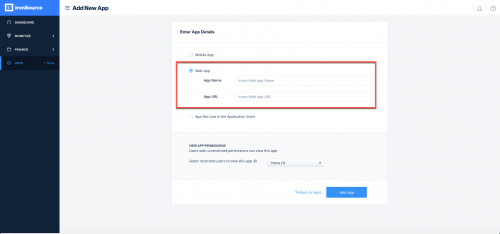
- Choose ‘Web App‘, fill in the app’s name and URL:
Default Placement
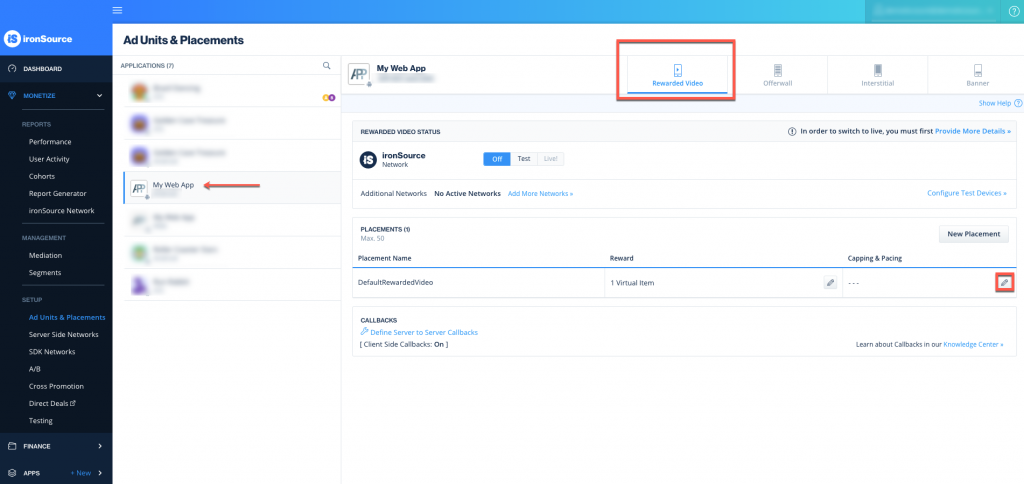
Navigate to the Ad Units & Placements page and keep the “Rewarded Item Name” and “Reward Amount” as the default:
Activate the Ad Unit
To go live with the Interstitial ad unit, you will need to reach out to your account manager.
Step 2. Integrate the SDK in Your Site/App
Integrate the SDK
To integrate the ironSource SDK with your site/application with our SDK, add the following code to your site:
   <script src="https://static.ultra-rv.com/rv-min.js"></script>
   <script type="text/javascript">
       var ironRV = IronRV.getInstance({
                applicationKey : "APPLICATION_KEY",
                applicationUserId : "APPLICATION_USER_ID",
                adunit : "ins"
        });
 </script>
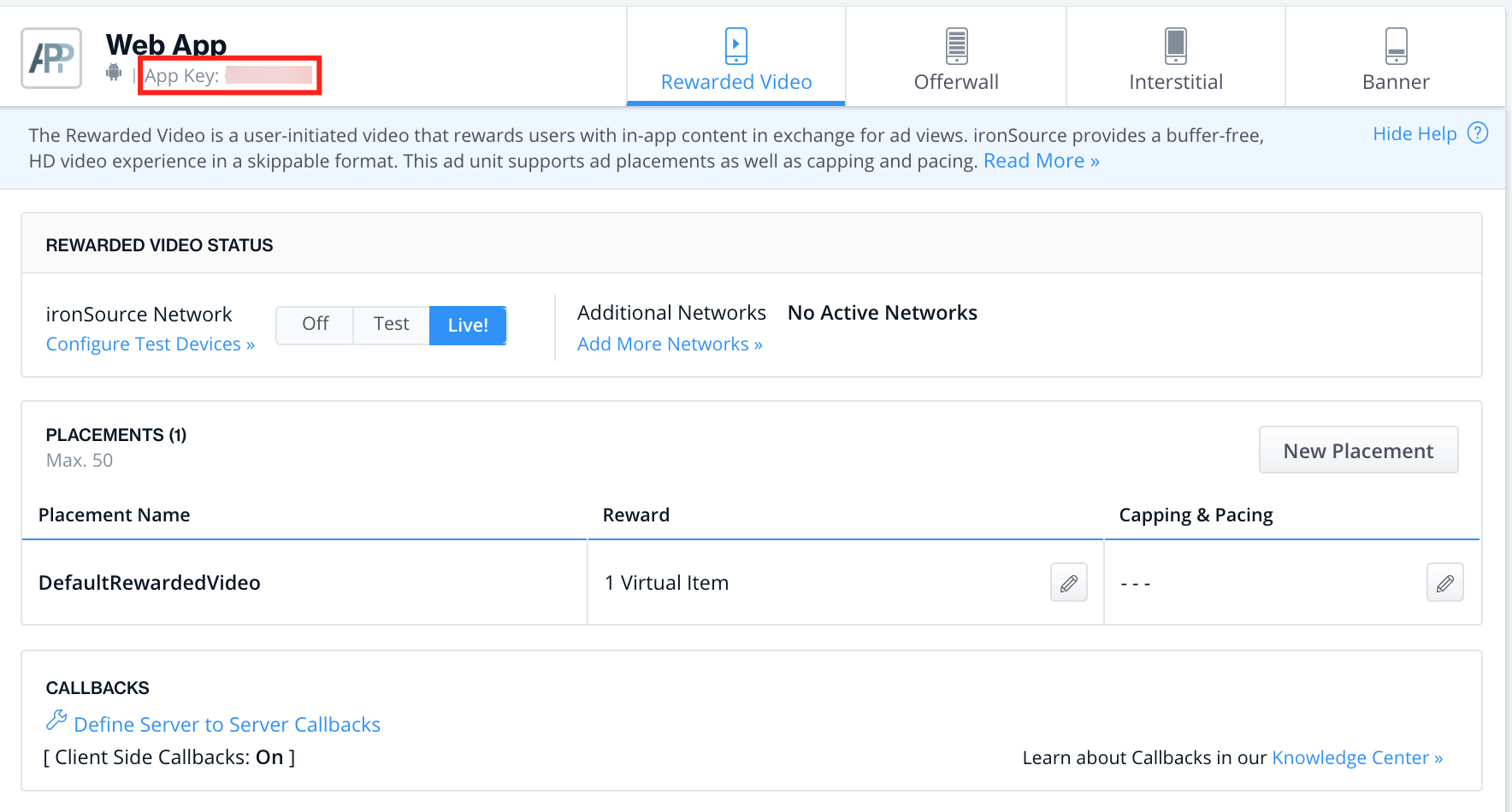
- Application Key: the unique identifier for your app in ironSource’s system. This parameter can be found in the Ad Units & Placements page in your ironSource account:
- Application user ID: The user ID is a unique identifier for each of your users that you need to set. We support NSString from 1 to 64 characters.
Show Interstitial
The JS-Tag checks the availability of campaigns for the user. If there are available campaigns – you will be notified by the “ready” event. Once ready, you can display the unit, i.e. between levels or activities. Once location is determined, you must call the following function:
ironRV.show();
Events:
| ready | Arguments: NoneironRV.addListener(IronRV.EVENTS.READY, function() {
console.log("Ready");
});
|
| open | Arguments: NoneironRV.addListener(IronRV.EVENTS.OPEN, function() {
console.log("Opened");
});
|
| close | Arguments: None. Fired when the close button is clicked. ironRV.addListener(IronRV.EVENTS.CLOSE, function() {
console.log("Closed");
});
|
| completion | Arguments: None. Fired when the user completed the offer. Use this event to gain information on the amount of rewards and award the user accordingly. ironRV.addListener(IronRV.EVENTS.COMPLETION, function() {
console.log("Completion");
});
|
| no_campaigns | Arguments: None. Fired when user has completed all offers in the current session. ironRV.addListener(IronRV.EVENTS.NO_CAMPAIGNS,function() {
console.log("No Campaigns");
});
|
| onAdBlockDetected | Arguments: None. Fired when system detects an AdBlock on the client. ironRV.addListener(IronRV.EVENTS.AD_BLOCK, function() {
ironRV.showAdBlockMessage();
});
|
| resize |
Arguments : dimensions.
ironRV.addListener(IronRV.EVENTS.RESIZE, function(dimensions) {
console.log(dimensions.width);
console.log(dimensions.height);
});
|
| init_error |
Arguments : None.
Fired when user session is blocked by the ad server (can be variety of reasons why)
ironRV.addListener(IronRV.EVENTS.INIT_ERROR, function() {
console.log("init error");
});
|
Full Sample Code:
<html>
<head>
<script src="https://static.ultra-rv.com/rv-min.js"></script>
<script type="text/javascript">
var params = {
applicationKey : "62566aa5",
applicationUserId : "my-user-id",
adunit : ״ins״
};
ironRV = IronRV.getInstance(params);
ironRV.addListener(IronRV.EVENTS.READY, function() {
      console.log("Ready");
});
ironRV.addListener(IronRV.EVENTS.OPEN, function() {
      console.log("Opened");
});
ironRV.addListener(IronRV.EVENTS.CLOSE, function() {
      console.log("Closed");
});
ironRV.addListener(IronRV.EVENTS.NO_CAMPAIGNS, function() {
console.log("No Campaigns");
});
ironRV.addListener(IronRV.EVENTS.COMPLETION, function() {
      console.log("Completion");
});
function showRV() {
ironRV.show();
}
</script>
</head>
<body>
<button onClick="showRV()">ShowRV</button>
</body>
</html>
Step 3. Add the Callback to Your Site/App (Optional)
By default, you will receive callbacks to your client to inform you of completions and user rewards. In addition, if you wish to receive callbacks to your server, follow the below instructions to set these up.
S2S Callback URL
Our server-to-server callback is an HTTP GET script that will be called from our servers to inform you about a commission event. The URL must include the following placeholders, which can be located anywhere in your URL, according to your preference:
| Placeholder | Mandatory | Description |
| [USER_ID] | Mandatory | The identification of the user to be credited. Note that the URL-encoded form will be passed in this placeholder, for example, “123%40abc.com” rather than “123@abc.com” |
| [REWARDS] | Mandatory | The amount of points to be credited to the user.
Note:
Note: You can use this callback to your server instead of client-side completion callback to trigger rewards to your users.
|
| [EVENT_ID] | Mandatory | A unique identifier of the commission event, represented as a MD5 string (32 alphanumeric characters) |
| [ITEM_NAME] | Optional | This placeholder is for publishers using the “item unlock” parameters. More details in the Advanced Settings table |
| Private Key | Highly Recommended | A custom string which will be used to hash each callback call and other sensitive information. You can use it in order to verify the authenticity of callback events. |
| Admin user id | Optional | Your personal user ID for this application/site. Offers that are presented to this particular user ID can be manipulated for testing purposes. Encode this user ID (for example, enter “123@abc.com” rather than “123%40abc.com”). More details in the callback functionality section below. |
HTTP Callback Parameters
Our system will automatically add two parameters to the HTTP callback URL:
- Timestamp – a string representation of the exact timestamp in which this callback has been called, in the following format: [4 digit year][2 digit month][2 digit day][2 digit hour][2 digit minute], e.g. “201701021455” stands for January 2, 2017 14:55.
- Signature – an MD5 hash string based on sensitive parameters, which you can use to verify that the callback came from our system. This key is generated automatically based on the following formula:
md5([TIMESTAMP][EVENT_ID][USER_ID][REWARDS][PRIVATE_KEY]). The [USER_ID] element is the URL-decoded value of the userID (for example, “123@abc.com” rather than “123%40abc.com”).
In addition, you will receive a Private Key. The [PRIVATE_KEY] element is the exact string that you supplied when you defined your application/site. By generating the MD5 hash string using the very same parameters on your side and comparing it to the value in the signature parameter that you received from us, you can safely authenticate each callback event.
HTTP Callback Custom Parameter
In order to pass custom parameter within the callback , you will need to add another parameter during the initialization of the API called “pubCustomParams”:
- This parameter can be used for any type of information you want pass in the callback
- This parameter accepts type of array with pair of “key:value” separated by comma
- The SDK supports up to three custom parameters that can be sent every time
- The custom parameter have to be url encoded string
Sample Code:
<script type="text/javascript">
	 var ironRV = IronRV.getInstance({
		applicationKey		: "APPLICATION_KEY",
		applicationUserId	: "APPLICATION_USER_ID",
		pubCustomParams      : [custom1:”value1”,custom2:”value2”]
	 });
  </script>
Callback Functionality
Whenever a commission event is generated, our server will call your callback URL and provide the necessary information you need to credit the relevant user.
Our server will keep calling this URL periodically for every commission until it receives a valid HTTP response with status 200 (Ok), where the “[EVENT_ID]:OK” string appears somewhere in the HTTP response.
Here is an example of a typical response:
<xml>
<status>dae8e6cf42b1357f8652ad6ecb5b24f1:OK</status>
</xml>
Thanks to this methodology, any temporary communication problems will not prevent crucial information from reaching its destination.
We recommend taking additional measures to secure callbacks. You may reject any calls that do not originate from the following IP addresses:
- 79.125.5.179
- 79.125.26.193
- 79.125.117.130
- 176.34.224.39
- 176.34.224.41
- 176.34.224.49
- 34.194.180.125
- 34.196.56.165
- 34.196.251.81
- 34.196.253.23
- 54.88.253.218
- 54.209.185.78